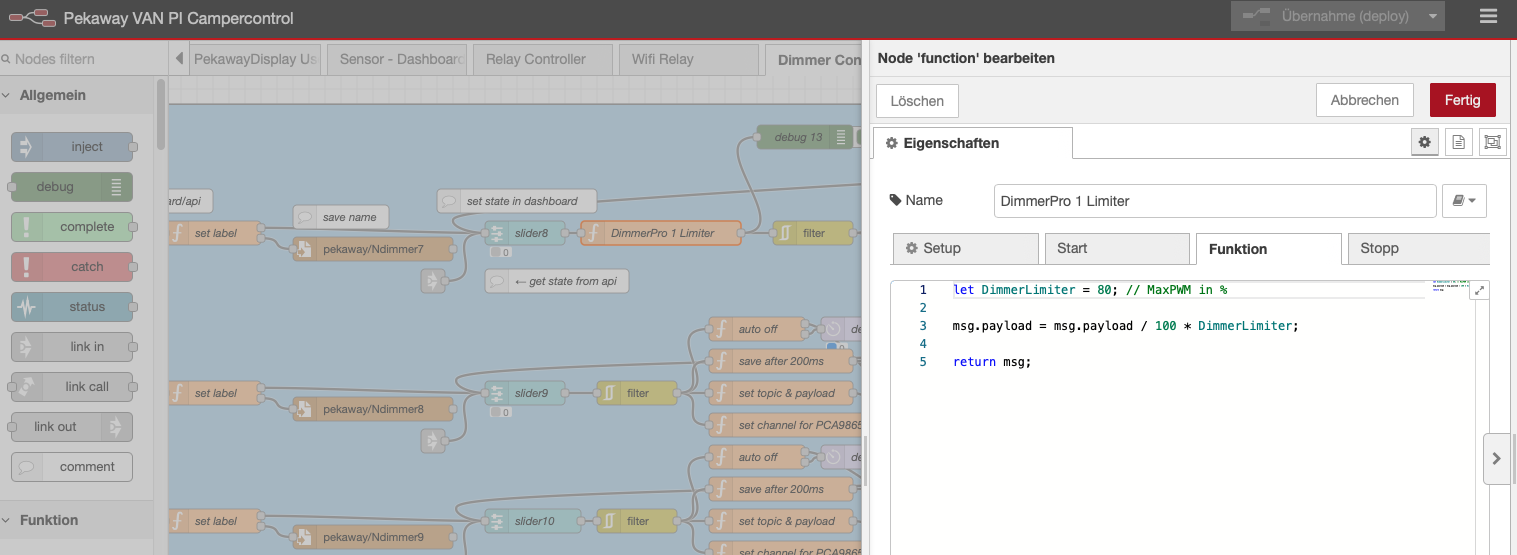
Hello, I am new in the pekaway comunity. I have build a system with core pro, inoutX and dimmy pro on a 24V system. I have installed all and now I am programming all the components. I have 7 channel of the dimmy pro linked to 24V led strip, the problem is that the output voltage of a 24V is very variable depending on the SOC and on the charging moments (from 25 to 28.4 V). When I have the voltage more than 26.5V the led strips shut down. If I use the app for dimming is not a problem because you can set the light at 70% and they work well but with the phisical button on the camper is difficult to set the light without goint to much high. My question is if it is possible to limit the interval of dimming for example from 10% to 70% by programming, the alternative is to add a 24V stabiliser before the dimmy DC imput.
There is a setting in the web interface where you can limit the maximum PWM for the dimmer.
The voltage should not be the problem here; rather, the overload caused by the high voltage causes the LEDs to become very warm and have a much higher power consumption than specified.
Please try the setting in the web interface and set it to 65% or 70%. The LEDs should then still be bright enough and only run at this maximum via the buttons.
I have found the setting but it create 8 dimmers that not links to the dimmy pro exit. I want to link the screeshot by the system said that new user can not insert immages. my strip on the dimmy did not shows this pwm limitation
I’ll try to explain better since it’s difficult without being able to upload images. So I enabled the “Dimmers” checkbox in the top left, and once enabled, it displays 8 additional outputs, but they don’t replace the 8 outputs I already had enabled on the Dimmy Pro. In these 8 new outputs (which I don’t understand which physical outputs they’re associated with), the adjustment bar for maximum PWM appears at the bottom. However, under my Dimmy Pro outputs, this bar doesn’t appear. Perhaps this is something implemented for the old Dimmy board and not yet created for the Pro version? Even trying to use these new outputs, they don’t match the Dimmy Pro outputs because when I try to dim, turn on, or turn off in the web interface, I see that the values shift, but in the actual output on the Dimmy Pro, nothing happens. Could you just tell me if I’m doing something wrong or if there’s actually a problem with the system on the Pro version?
Hello ahtdf, unfortunately also if I set this limit value for the pwm din not change the maximum limit on the dimmy pro exits. My strip continue to go to the maxmum pwm avaible.
It is correct that there is only one option to set the maximum pwm in percent. It is only visible if the dimmers are set to active in the UI. Dimmers here refer to the original Dimmy, nonetheless the value for max pwm is used on the DimmyPro calculations too, regardless if the original dimmers are activated or not.
Max pwm defaults to 80% btw.
Also we do use gamma correction in the calculations, to smoothen out the visual effects when dimming lights up or down. That basically means, the brighter the LEDs, the less difference you will see when changing the values, especially near the (capped) top.
Try the following please:
Activate the original dimmy, set max pwm to 50% and gamma to 1. Then go back to the sliders and set the slider for DimmyPro (not for the orignal dimmy) to 100%. that should result in a final pwm value of about 2048. If that is not the case, can you confirm that you get a result of 4095? Either through Node-RED or an actual oscilloscope?
Note:
If you’re using 24V LED strips, the difference between 100 % and a capped value like 80 % can be almost invisible to the eye even though the PWM signal is correctly reduced.
Compared to 12V strips, the 24V strips run more LEDs in series and stay very efficient, so even at 80 % duty they still appear nearly full-bright.
Combined with gamma correction and the way our eyes perceive brightness (less sensitive near the top end, as mentioned above), the change can be hard to notice visually.
Again, to be sure the limit works, either check the numeric PWM value in Node-RED or measure the duty cycle. That should confirm the cap is active even if it doesn’t look dimmer.